






































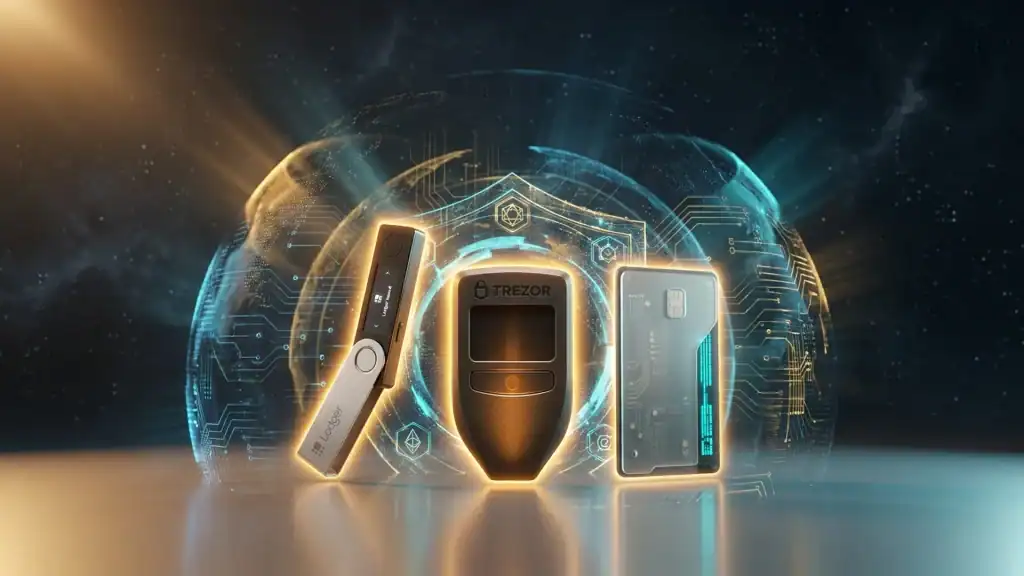
Hardware wallets are the gold standard for securing cryptocurrency long-term. By storing private keys in dedicated hardware disconnected from the internet, hardware wallets protect against the hacks, malware, and phishing attacks that plague exchange and hot wallet storage. In 2026, the Ledger Nano X, Trezor Safe 3, Cypherock X1, and a few other standouts represent the best options for different budgets and use cases. This guide compares features, security, and prices to help you choose the right wallet for your needs.
Key Takeaways
- Hardware wallets provide the most secure way to store cryptocurrency long-term.
- Top hardware wallets of 2026 include Ledger Nano X, Trezor Model T, Trezor Safe 3, and Cypherock X1.
- Ledger offers the widest coin support and mobile-first experience.
- Trezor is open-source and favored by security purists who verify code.
- Price range is $59-$249, with setup taking 15-30 minutes for most users.
Why Hardware Wallets Matter
Cryptocurrency theft happens primarily through compromised private keys. Hardware wallets eliminate the most common attack vectors:
- Malware:Keys never touch the internet-connected computer
- Phishing:Transactions require physical confirmation on the device
- Exchange hacks:Self-custody eliminates exchange exposure
- SIM swaps:Physical possession required for access
- Remote attacks:Air-gapped options provide additional protection
Top Hardware Wallets of 2026
| Wallet | Price | Best For | Coins |
|---|---|---|---|
| Ledger Nano X | $149 | Most users | 5,500+ |
| Ledger Nano S Plus | $79 | Budget option | 5,500+ |
| Ledger Stax | $399 | Premium experience | 5,500+ |
| Trezor Model T | $219 | Open-source fans | 1,400+ |
| Trezor Safe 3 | $79 | Modern Trezor | 1,400+ |
| Cypherock X1 | $199 | Multi-share security | 7,000+ |
| BitBox02 | $149 | Swiss-made simplicity | Limited |
| COLDCARD Q | $219 | Bitcoin-only power users | Bitcoin only |
Ledger Nano X: Best Overall
The Ledger Nano X remains the most versatile hardware wallet for most users.
Key Features
- Bluetooth connectivity for mobile use
- Support for 5,500+ cryptocurrencies
- Ledger Live app integration
- Secure Element (CC EAL5+) chip
- Built-in battery for mobile use
Strengths and Limitations
- Strengths:Widest coin support, best mobile experience, extensive ecosystem
- Limitations:Firmware not fully open-source, past data breach of customer info
💡 Tip:If you frequently use your wallet on mobile or hold many different cryptocurrencies, the Nano X’s Bluetooth and coin support justify its price over the Nano S Plus.
Trezor Model T / Safe 3: Best Open-Source
Trezor pioneered the hardware wallet concept and remains favored for its open-source firmware and clean design philosophy.
Trezor Model T Features
- Touchscreen interface
- Fully open-source firmware
- MicroSD support for encrypted storage
- Shamir Backup (multiple backup shares)
- Passphrase protection
Trezor Safe 3: The Modern Option
The newer Trezor Safe 3 adds a Secure Element chip while maintaining Trezor’s open-source approach, bridging the gap with Ledger’s security model at a lower price point.
Cypherock X1: Most Innovative
Cypherock takes a unique approach by splitting your seed across multiple physical cards, eliminating the single point of failure traditional hardware wallets share.
Multi-Share Security
- Seed split across 5 NFC cards
- Requires any 2 of 5 to access funds
- Each card encrypted independently
- No traditional seed phrase backup needed
⚠️ Warning:Cypherock’s innovative approach is more complex. Ensure you understand the recovery process thoroughly before committing significant funds to this wallet.
Hardware Wallet Setup Best Practices
Before Setup
- Buy ONLY from the official manufacturer website
- Never buy from Amazon marketplace, eBay, or third-party sellers
- Verify the device packaging is unopened and tamper-evident
- Have paper and pen ready for seed phrase (never digital)
During Setup
- Initialize the device yourself (never use pre-configured devices)
- Choose to generate a NEW seed phrase (not import)
- Write the seed phrase on paper, using exact spelling
- Verify the seed phrase by re-entering on device when prompted
- Set a strong PIN (8+ digits recommended)
- Consider adding passphrase protection for additional security
After Setup
- Store seed phrase in multiple secure locations
- Consider metal seed storage (Cryptosteel, Billfodl) for fire/water resistance
- Test recovery with small amounts before trusting with larger amounts
- Keep device firmware updated but verify updates through official sources
Seed Phrase Storage Best Practices
Your seed phrase is the master key to your crypto. Losing or compromising it means total loss.
DO:
- Write on paper (or metal for durability)
- Store in multiple geographically separated locations
- Use a safe or safety deposit box for primary backup
- Consider Shamir Backup for additional security
- Memorize if possible (never as only backup)
DON’T:
- Photograph the seed phrase
- Store in cloud services (Dropbox, iCloud, Google Drive)
- Email or text the phrase to yourself
- Share with anyone claiming to be support
- Store all copies in one location
- Type into any computer or phone
⚠️ Warning:Never share your seed phrase with anyone, not customer support, not “verification” services, not trusted friends. Anyone with your seed phrase can steal all your cryptocurrency.
Advanced Security: Passphrase Protection
Most hardware wallets support an optional 25th word (passphrase) that dramatically increases security:
- Creates a hidden wallet separate from the seed-only wallet
- Protects against physical coercion (“deniable encryption”)
- Must be memorized or stored separately from seed
- Loss of passphrase means loss of those funds
For high-value holdings, passphrase protection is strongly recommended.
What to Avoid
- Used hardware wallets:May be compromised with malicious firmware
- “Cheap” knock-offs:Counterfeit devices are security disasters
- Third-party wallet apps:Use official manufacturer apps only
- SMS-based recovery:No legitimate hardware wallet uses SMS recovery
- Seed phrase “recovery services”:These are all scams
📌 Note:Hardware wallets are the foundation of serious cryptocurrency security, but they’re not magic. Proper setup, storage, and operational security matter as much as the device itself.
Choosing Your Hardware Wallet
Pick based on your situation:
- Most users:Ledger Nano X for versatility and coin support
- Budget-conscious:Ledger Nano S Plus or Trezor Safe 3
- Open-source priority:Trezor Model T or Safe 3
- Bitcoin maximalist:COLDCARD Q for Bitcoin-only features
- Maximum security innovation:Cypherock X1 multi-share approach
- Premium experience:Ledger Stax for the best UX
Conclusion: Your Crypto Deserves Proper Security
Hardware wallets transform cryptocurrency from exchange-dependent holdings into truly self-sovereign assets. The security improvement over hot wallets or exchange storage is dramatic, and the relatively small investment ($79-$399) is justified for any meaningful holdings.
Select your hardware wallet, invest the time to set it up properly, establish rigorous backup procedures, and test your recovery process. The resulting security foundation will serve you through years of crypto market cycles ahead.